post / 2023.06.27
Obsidian Basics
This article was last updated on 2023-06-27. Please note that the content may no longer be applicable.
Interface
Want to master Obsidian in one hour? This guide is all you need. [Complete Step-by-Step Obsidian Tutorial] - Zhihu
Create vault folder → Create note category folders within vault → Organize notes
Obsidian Help
Top bar of notes → Vertical three-dot menu → Split view
Wyatt: Building Your Workspace [Complete Step-by-Step Obsidian Tutorial] 216 upvotes · 7 comments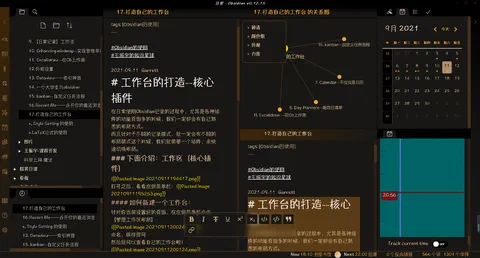
View outline in top-left corner
Plugins (To Be Explored)
Wyatt: How to Install Plugins? [Complete Step-by-Step Obsidian Tutorial] 264 upvotes · 63 comments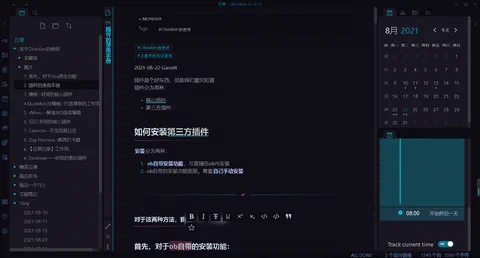
Text Formatting
Use # + space for headings. More # = lower heading level.
Emphasis
Italic
Alternative italic syntax (English underscores)
Bold
Bold example (double asterisks)
Or double underscores
Combined Usage
This is italic + bold
Strikethrough
Since we’re pursuing excitement, let’s go all the way
Highlight
==Sparse shadows slant across clear shallow water; subtle fragrance wafts under moonlit dusk==
Footnotes
Text1Text
Comments
- Inline comments
%%This is an inline comment%% - Multi-line comments
%%
You are the mist of an April dawn
Twilight carries the softness of wind
Stars twinkle unintentionally
Fine rain dots the flowers
%%
Lists
- Unordered list
- Hyphen + space
- Tab + hyphen + space to indent as sub-item
- Ordered list
- Number + period + space
- Similarly, tab + number + period + space for indentation
Images
- $$$$
- ![[Pasted image 20230625203344.png]]
- Adjust width
- $$$$
- ![[Pasted image 20230625203536.png]]
External Links
Linking to notes/images in vault
- $http://obsidian.md - automatic!$
- Web link (URL displayed as-is, $ for formatting only)
- $[obsidian](http://obsidian.md)$
- Web link (display text in brackets)
Obsidian URL
Obsidian URIs typically follow this format:
Where action specifies the operation and value are parameters.
Example for opening a note:
Note: Use correct brackets/colons (Chinese/English)
Example:
Open Calculus
Here, path requires absolute file path.
- Open vault (folder only, no specific file)
$$[name](obsidian://open?vault=vault_name/vault_ID)$$
Open Notes Folder - Open Calculus under Math folder (.md extension optional)
Calculus
Others
Escape spaces in URLs as
%20- The
%in%20must be escaped as\%
- The
Alternatively, wrap space-containing content with
<>Blockquote
$$> Quoted content$$
$$\ Source$$
Example:
Time is a one-way journey; both good and bad are scenery.
\ — “Time Thief” by Jin Wenqi
Inline code
#include<stdc++.h>Code block
Obsidian recognizes content wrapped in six backticks as code blocks and formats them accordingly. Code blocks support syntax highlighting—declare the language on the first line (after opening backticks) for specific highlighting.
#include<stdc++.h>
using namespace std;
int main(){
    int a=1;
    for(int b=2;b<10;b++){
        a+=b;
        cout<<a<<endl;
    }
    return 0;
}
Corresponding footnote
Footnotes can span multiple lines using indentation ↩︎
Sponsor / I took a taxi home for sixty or seventy dollars!


When will I have a drink and discuss the details again?